Zmodo
- 2.0
- Rating
- 1.00M
- Installs
- Free
- Price

 Analysis by App-foxy
I approached Zmodo as a first-time owner would: I wanted to know whether it could make a connected home easier to manage, not simply whether it could display a camera feed. This free Lifestyle app is built by Zmodo Support for people using Zmodo connected-home products, and its purpose is straightforward: bring those devices into one place instead of making you move between separate controls.
My overall impression is practical rather than flashy. The app can be useful when your home already contains compatible Zmodo equipment, especially if you want a single starting point for checking and managing it. At the same time, it is not a universal smart-home controller. Its value depends heavily on owning the right Zmodo products and having a setup that the app can recognize without friction.
The Android listing shows a 3.1 average from around 20 thousand ratings, with more than a million installs. That tells me the app has a substantial user base, but it also suggests a mixed experience. I would not install it expecting every setup to feel effortless. I would install it because it is the natural control point for Zmodo hardware, then give myself a few minutes to work through the initial connection carefully.
You May Also Like

 Blood Strike: 2.5 Anniversary
Blood Strike’s Loadouts Turn Every Drop Into a Tactical Gamble
A close look at Blood Strike’s custom loadouts: how fast access to signature weapons reshapes its battle royale rhythm, rewards preparation, and narrows the gap between fights.

 Pandora - Music & Podcasts
Pandora’s Music Is Easy to Start, but Harder to Recover
Pandora’s strength is its low-effort path from a seed to a station. Its weak spot is how much confidence it asks you to place in connection, setup, and quiet recovery.

 8 Ball Pool
 Is Built on Rivalries, Rematches, and Routine
A close look at the rivalries, rematches, shared routines, and unanswered safety questions that turn a quick pool match into a persistent mobile community.

 Samsung Music
’s Quiet Strength Is Playing What You Already Own
Its reach comes less from spectacle than from dependable access to a personal library. That simplicity is both the app’s strongest retention engine and its ceiling.

 AccuWeather: Weather Radar
AccuWeather Review: A Quick, Clear Forecast for Everyday Decisions
For everyday plans, the best forecast is the one you can understand quickly. AccuWeather makes rain timing, radar, and local conditions easy to act on, with a few trade-offs.

 Hill Climb Racing
Why Hill Climb Racing Still Turns Crashes Into One More Run
A tiny car, a bumpy hill and one more upgrade: Hill Climb Racing keeps resurfacing because its simple chaos makes every near-miss feel personal.
More From Our News Desk
View All News


Getting from installation to a useful first result
I find the first setup goes more smoothly when I treat it as a small, deliberate test rather than an invitation to configure the whole home at once. I would choose one device, keep it within reach, and check that its name and intended task are clear before moving on. That simple start makes the next question easier: what does the app actually do for a Zmodo household?
What the app is really for
The most important thing to understand before opening it is that Zmodo is a companion app, not a standalone lifestyle tool. Its usefulness begins with compatible Zmodo connected-home products. If you are comparing it with a general smart-home platform, the distinction matters: a broad platform may bring together devices from multiple brands, while this app is focused on the Zmodo equipment it is designed to support.
That focused approach can be an advantage. A dedicated app does not need to make every brand behave in the same way, and a Zmodo owner has a clearer place to start when checking a device. It can also be a limitation for households that have deliberately mixed cameras, sensors, lights, and other products from different manufacturers. In that situation, a wider ecosystem may be more convenient for everyday control, even if you still keep this app installed for Zmodo-specific tasks.
I would describe the app as a control layer rather than a complete home-management strategy. It gives your Zmodo products a shared point of access, but the quality of the experience still depends on the products themselves, the network they use, and how clearly you organize your home around them.
Preparing for the first setup
Before starting, I recommend deciding where the first device will be used and what you want to accomplish. A simple goal is better than trying to configure an entire home at once. For example, choose one camera or connected product and aim to reach the point where you can open the app and check that device reliably.
Install the app on a supported Android device. The minimum operating-system requirement is Android 5.0, so it covers older phones as well as newer ones, although an older phone may feel less comfortable for frequent monitoring. The current version is 7.0.0.8, and keeping the app current is sensible when you are troubleshooting compatibility or setup behavior.
Have the product nearby during the first attempt. This sounds obvious, but it removes a common source of confusion: trying to add a device while it is already mounted in a difficult location or while you are unsure which physical unit you are configuring. I find it much easier to identify labels, status lights, and reset controls before installation is finished.
Another useful habit is to treat the first session as an identification exercise. Confirm which Zmodo device you are holding, where it will be used, and what you want its name to communicate. A name such as “front entrance” is more helpful later than a vague label that forces you to remember a model or position.
Making the first meaningful connection
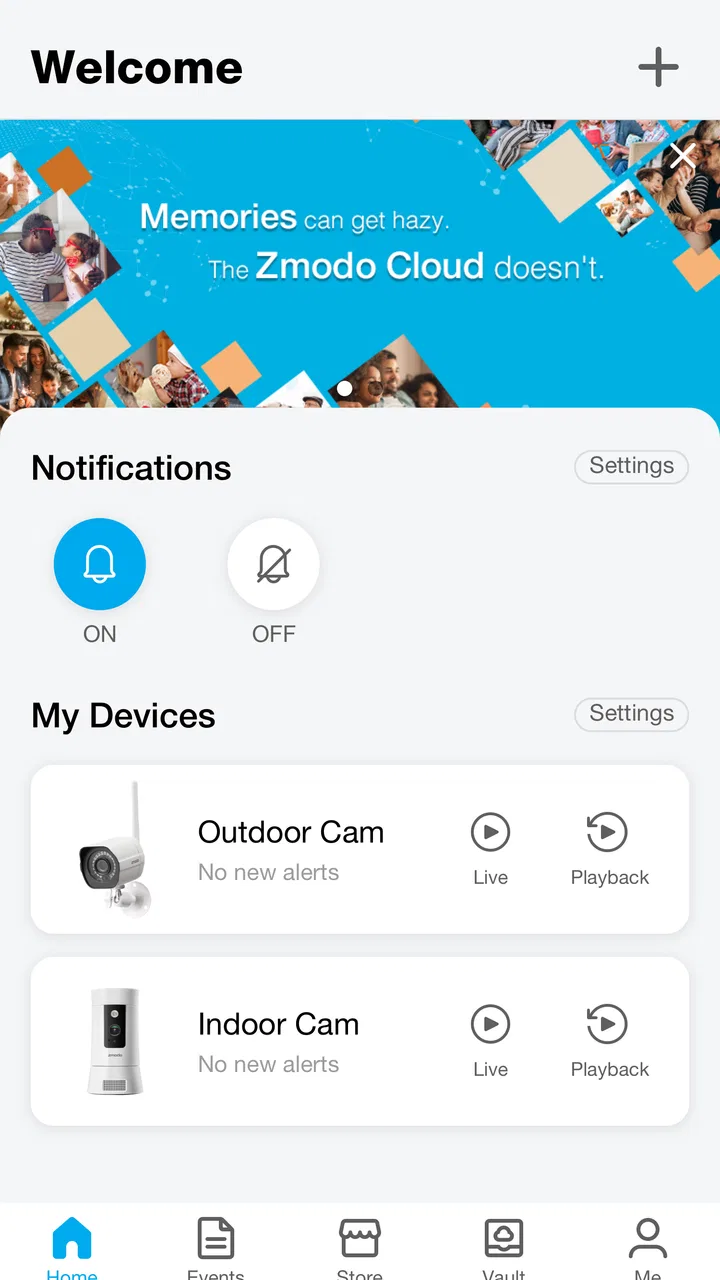
The first success should not be “I opened the app.” It should be a practical result: I can select the connected product I intended to use and reach its available controls without guessing. Work toward that result one device at a time, rather than adding several products and then trying to determine which one caused a problem.
When the app presents a device setup path, follow it in the same order as the physical installation. Keep the product close enough to inspect while using the phone. If the app asks you to identify or confirm a device, pause and compare what you see on screen with the hardware in front of you. Rushing through this part can create a confusing home list later.
Once the device appears, test the action you installed it for. If it is a security-focused product, the useful test is whether you can reach its live information when you need it. If it is another type of Zmodo connected product, test the control that matters in your daily routine. The point is to prove the complete path from phone to device, not merely to finish a setup screen.
I also recommend closing and reopening the app after the first successful connection. This is a small but valuable check. It helps you learn where the device appears when you return later, and it shows whether your home screen is understandable without relying on the setup flow. If you have more than one product, this is the moment to confirm that the names and order make sense.
A realistic everyday example
Imagine arriving home and wanting to check the entrance before opening the door to a delivery. The helpful workflow is not complicated: open Zmodo, identify the entrance device immediately, and use the relevant view or control. That only feels simple if the initial naming and organization were done carefully.
This is where a dedicated app can be more comfortable than searching through separate product screens. You establish one familiar starting point for Zmodo equipment. The trade-off is that the app does not solve unrelated household tasks. If your delivery alert, door lock, lighting, and Zmodo device live in different ecosystems, you may still need several apps to complete the whole arrival routine.
For a first-time user, I would start with this one repeatable scenario. Do not judge the app only by its installation screens. Judge it by whether you can perform the same useful check on an ordinary day without remembering technical details.
Confusion that can happen during setup
The biggest source of uncertainty is usually the boundary between the app and the hardware. Zmodo is the control point, but it cannot compensate for every issue involving placement, connectivity, power, or the condition of a device. If something does not appear as expected, I would first verify the physical product and its basic connection before repeatedly tapping through the app.
Another common mistake is assuming that every Zmodo product will present an identical experience. The app groups the brand’s connected-home products, but different devices can have different controls and different reasons for needing attention. A camera-oriented workflow should not be used as a mental model for every other product in the Zmodo range.
Names can also become a hidden problem. If two devices have similar labels, the app may feel unreliable even when it is showing the correct information. I prefer names based on location and purpose, and I change them immediately if the default wording is hard to distinguish. This is one of the simplest improvements a new user can make without changing hardware or settings.
There is also a difference between seeing a device and trusting it as part of a routine. After setup, test it at the time and from the place where you expect to use it. A product that works beside the router during installation may be less convenient in its final position. I would rather discover that during a deliberate test than during an urgent check.
What the rating tells me as a buyer
The 3.1 average is worth considering before downloading. It does not automatically mean the app is unsuitable, but it does make me cautious about promising a smooth experience for every household. Reviews at this level often reflect the interaction between software and a wide variety of devices, networks, phones, and expectations.
The app has been available since November 20, 2015, so it is not a brand-new experiment. Its long presence and install base make it a reasonable choice for an existing Zmodo owner who needs the company’s control app. However, longevity should not be confused with universal polish. I would still evaluate it against the specific product I own and the routine I need it to support.
For someone choosing hardware today, the app experience should be part of the decision. A device can look appealing on its own, but daily use happens through the companion software. If you dislike the idea of maintaining a brand-specific app, a different ecosystem with a broader controller may suit you better.
Privacy, cost, and expectations
The app itself is free to install, which makes trying it straightforward for someone who already owns Zmodo equipment. The listing also includes in-app purchases ranging from $4.99 to $399.99 per item. I would therefore check the purchase details shown in the app before approving anything, especially if a feature or service is presented during setup.
That pricing range is broad enough that I would not assume every useful function is included simply because the download costs nothing. A careful user should distinguish between installing the controller, using the connected product, and any optional purchase associated with the wider experience. If your goal is only to access equipment you already own, read each purchase screen rather than accepting it automatically.
The content rating is Everyone, which makes the app broadly suitable from an age-rating perspective. That does not remove the need for sensible household decisions around connected devices. I would still choose clear account practices, avoid sharing access casually, and make sure other household members understand which device they are controlling.
Useful habits after the first success
Once the first device works, add the next product separately and test it before moving on. This creates a simple troubleshooting trail. If the first device is fine and the second is not, you have a much clearer idea of where to look than you would after adding everything in one long session.
Keep the app’s device names aligned with the names people in your home actually use. “Side door” is valuable only if everyone means the same side door. This matters when a quick decision is needed and there is no time to inspect several similar entries.
I would also review the app after a short period of normal use, not just immediately after installation. Notice which device you open most often, which one is hard to find, and which controls require unnecessary searching. That review can lead to a better arrangement or a decision to use a different platform for broader household routines.
A further trade-off is centralization. Putting Zmodo products in one app reduces brand-specific searching, but it also concentrates your dependence on one developer’s software. If a particular function is essential to your routine, keep a simple backup plan: know where the physical device is, how to use it locally when applicable, and which other household actions do not depend on this app.
Who will appreciate it most
I think Zmodo is best suited to existing Zmodo customers who want one recognizable place to manage their connected-home products. It is also a reasonable choice for a first-time user who prefers a focused brand ecosystem and is willing to spend a little time on careful setup rather than expecting instant automation.
It is less convincing for someone who has not chosen hardware yet and wants one app to control a wide mixture of brands. In that case, compare the broader ecosystem first. A general smart-home platform may offer a more unified household routine, while this app remains useful only for the Zmodo portion of the setup.
I would also hesitate to recommend it as the sole basis for a high-stakes security routine without testing the complete setup in the actual home. The app can be an important access point, but reliability is personal and environmental. Your network, phone, product placement, and daily habits all influence whether it feels dependable.
My next-step recommendation
If you already own a Zmodo connected-home product, install the app and begin with one device in its final location. Give that device a clear name, complete one meaningful action, then repeat the test after reopening the app. That path gives you a realistic answer quickly: not just whether setup finishes, but whether the app fits the way you intend to use your home.
If you are still deciding between brands, treat the app as part of the product rather than an afterthought. The free download and broad device focus are appealing, but the mixed rating and possible in-app purchases mean you should examine the everyday workflow carefully. A different platform may be better for a mixed-brand home, while Zmodo remains the sensible starting point for a home built around Zmodo equipment.
My final view is balanced: the app makes the most sense when it matches the hardware you already own. It can turn several Zmodo products into a more understandable routine, especially when you organize them thoughtfully and test the actions that matter. It is not a magic replacement for a whole-home platform, and it rewards patience during setup. For the right Zmodo household, that focus is useful; for everyone else, it is a reason to compare alternatives before committing.
FAQs for Zmodo
01What is Zmodo and how does it work?
Zmodo is a smart home security app that allows users to monitor their home through cameras and sensors. It works by connecting to Zmodo devices via Wi-Fi, enabling live streaming, motion detection alerts, and remote access. Users can manage their devices and view footage from anywhere using their smartphone or tablet.
02Is Zmodo compatible with all smart devices?
Zmodo is compatible with a range of smart devices, particularly those running on Android and iOS. However, it's essential to check the specific requirements of your Zmodo devices to ensure they work seamlessly with the app. Compatibility with smart hubs like Alexa and Google Assistant is also supported for voice control.
03How secure is the Zmodo app in terms of privacy?
Zmodo prioritizes user privacy and employs encryption protocols to protect data transmitted between devices and the app. However, users should regularly update the app and firmware to ensure maximum security. It's also recommended to use strong, unique passwords for both the app and associated accounts.
04What features does Zmodo offer for home monitoring?
Zmodo offers a variety of features, including live HD video streaming, night vision, two-way audio, and motion detection alerts. Users can schedule recordings, receive instant notifications, and store footage in the cloud. The app also allows for easy sharing of access with family members or trusted individuals.
05Are there any subscription fees associated with Zmodo?
While the basic functionalities of Zmodo are free, there are optional subscription plans for enhanced cloud storage and additional features. These plans vary in price and offer extended video history, increased storage capacity, and advanced analytics. Users can choose a plan that best fits their security needs and budget.
Pros
- User-friendly interface
- easy navigation.
- High-quality video streaming capability.
- Customizable alerts and notifications.
- Supports multiple camera setups.
- Remote access from various devices.
Cons
- Occasional connection drops.
- Limited free cloud storage.
- Some features require premium subscription.
- Setup can be time-consuming.
- Inconsistent motion detection alerts.

Zmodo
Gallery